

How to Onboard a New Remote Team Member in a Small Business
Hiring a remote team member can give a small business badly needed capacity, but hiring someone doesn't automatically remove work from your plate.
The first few weeks determine whether responsibilities actually begin moving away from the owner or manager, or whether the new hire spends their time waiting for instructions while you wonder why delegation isn't working.
For small businesses, remote onboarding does not need to involve an elaborate HR program or hundreds of pages of documentation.
It does need structure.
A strong remote onboarding process should give a new team member five things early:
Context: What does the business do, who does it serve and why does their role matter?
Clarity: What are they responsible for and what does good work look like?
Access: Which systems, information and people do they need?
Communication: Where should they ask questions, how quickly should they expect answers and when will you meet?
Increasing ownership: How will responsibilities move from learning to supported execution to independent ownership?
Those fundamentals are particularly important when onboarding remote administrative, executive or operations support because these roles often work across multiple parts of the business.
Current remote-onboarding guidance similarly emphasizes preparing access before day one, explicitly communicating norms that an in-office employee might otherwise learn informally, and creating a structured first 30 to 90 days. (FirstHR)
Before Day 1: Prepare the runway, not an encyclopedia
You do not need every process in your business documented before someone starts.
You should make sure they aren't sitting at their computer on Monday morning with nowhere to go and nothing they can access.
Before their first day, prepare the basics:
company email
communication platform
calendar access, if relevant
project or task management system
shared files and drives
password manager or secure credential access
relevant client systems
basic organizational chart or team overview
their first-week calendar
a clear role description
their initial responsibilities
Remote onboarding guides consistently recommend handling accounts, equipment and core access before the start date rather than burning the new hire's first day troubleshooting basic setup. (CharlieHR)
Then decide what you want them to understand by the end of their first week.
That's different from deciding everything they'll eventually own.
Give them the business context before the task list
This is especially important in a small business.
Your new remote assistant may be managing your calendar, communicating with clients, preparing invoices, coordinating projects or seeing your inbox.
Those tasks don't exist in isolation.
Before diving into individual procedures, explain:
What does the company do?
Who are your best clients?
What do those clients expect from you?
What matters disproportionately to you?
What are you trying to accomplish over the next 6 to 12 months?
Where does this person's role fit into that?
Someone who understands that context can make better decisions when they encounter something you haven't explicitly documented.
And they will encounter something you haven't explicitly documented.
Define outcomes, not just tasks
Compare these two instructions:
Task: Manage my calendar.
Versus:
Outcome: Protect my focus time while making sure important clients and sales opportunities can still get appropriate access to me.
The first tells your new team member what activity they're responsible for.
The second starts teaching them how to make decisions.
You still need rules.
Maybe client meetings can happen Tuesday through Thursday.
Maybe Fridays are protected.
Maybe a certain type of prospect gets priority.
Those are the guardrails.
But if you've explained the desired outcome, your remote assistant has a framework for dealing with situations that aren't explicitly covered by the rules.
For each major responsibility, define:
what they own
what “done” or successful looks like
what they can decide independently
what requires approval
what should be escalated immediately
Choose a few responsibilities to transfer first
One of the easiest ways to overwhelm a new remote team member is to give them a tour of everything you eventually want them to handle.
Start narrower.
For an administrative or virtual assistant, the first responsibilities might include:
calendar management
meeting preparation
CRM updates
routine client follow-up
document formatting
invoicing administration
For executive support, you may start with calendar and inbox support before introducing more complex coordination and prioritization.
For operations support, the person may need broader context early, but that still doesn't mean they should own every operational workflow in week one.
Start with work that allows them to learn the business while producing something you can review.
Then expand.
Communicate more than feels necessary in the beginning
Remote employees can't overhear the conversation happening in the next office.
They don't watch how you respond when a client asks an unusual question.
They can't lean over and ask, “Hey, is this normal?”
Remote onboarding therefore requires more intentional communication than many founders expect. Current small-business onboarding guidance specifically calls out the loss of informal, proximity-based learning and the need to communicate those norms deliberately. (Pitch N Hire)
During the first few weeks, establish:
A primary communication channel.Decide whether questions belong in Slack, Teams, email or your project management system.
Expected response times.Does everything need an immediate response? Probably not. Tell them what does.
Regular check-ins.A new remote hire should not spend four days wondering whether they're doing something correctly.
Permission to ask questions.Explicitly tell them that questions are expected during onboarding.
You are not trying to minimize communication during week one.
You are investing communication early so you need less of it later.
Teach through real work
Documentation is useful, but don't make reading documentation the entire onboarding experience.
Show the new person a process.
Explain the context.
Let them observe you completing it if necessary.
Have them try it.
Review the result.
Correct misunderstandings while they're small.
Then let them repeat it.
Existing VA onboarding guidance commonly recommends starting with a limited number of recurring responsibilities and expanding ownership as the assistant demonstrates understanding. (Virtual Assist USA)
When you encounter a process that genuinely needs documentation, document it as part of the handoff.
That has an additional benefit: your new team member can tell you which instructions make sense to someone who didn't invent the process.
Create a 30-60-90 day progression
A 90-day plan doesn't need to be complicated.
It simply gives you and the new team member a shared expectation for how independence should increase.
Days 1–30: Learn and calibrate
Focus on:
business and client context
tools and systems
communication norms
first recurring responsibilities
frequent feedback
learning preferences and working styles
By the end of this stage, they should independently own at least some of the responsibilities they were hired to handle.
Days 31–60: Expand ownership
Add responsibilities and reduce unnecessary check-ins.
Look for whether they're beginning to:
anticipate recurring needs
catch missing information
ask better questions
recognize patterns
solve familiar problems without assistance
suggest improvements
This is where you begin seeing whether you've merely transferred tasks or are actually creating leverage.
Days 61–90: Strengthen independence
By this point, the role should look increasingly like the job you intended to hire for.
Review:
what they fully own
where they still need unnecessary approval
where responsibilities remain unclear
which processes should be improved
which additional work can move off someone else's plate
A 30-60-90 structure is common in current remote onboarding guidance because it gives both sides explicit milestones rather than treating onboarding as a single first-week event. (FirstHR)
Give feedback before small problems become patterns
Do not save onboarding feedback for a 30-day review.
If a client email is too formal, say so.
If you expected a task to be handled differently, explain why.
If they're asking permission for decisions they can make independently, tell them.
If you're frustrated because they didn't do something you never actually told them was their responsibility, that's useful information too.
Early feedback should be frequent and relatively low drama.
You're calibrating.
The goal isn't to catch mistakes. It's to help two people develop a shared understanding of what good work looks like.
Don't confuse independence with silence
A good remote team member should become increasingly independent.
That doesn't mean they should stop communicating.
You want them to move from:
“What should I do?”
to:
“Here's what I think we should do and why.”
Eventually, many routine decisions shouldn't require your involvement at all.
That progression is a much better measure of onboarding success than simply counting how many SOPs they've read.
Remote onboarding checklist for small businesses
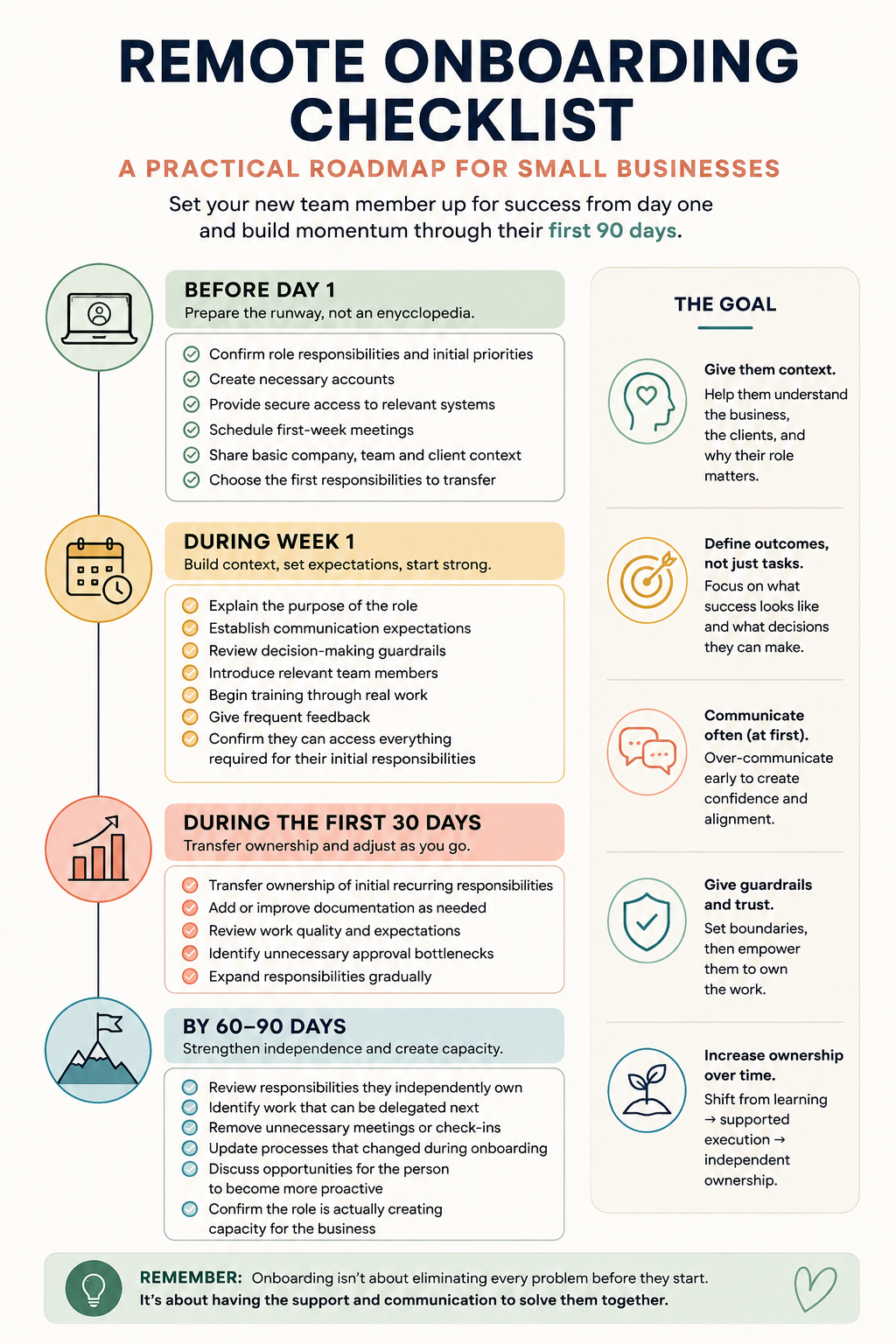
Before Day 1:
Confirm role responsibilities and initial priorities
Create necessary accounts
Provide secure access to relevant systems
Schedule first-week meetings
Share basic company, team and client context
Choose the first responsibilities to transfer
During Week 1:
Explain the purpose of the role
Establish communication expectations
Review decision-making guardrails
Introduce relevant team members
Begin training through real work
Give frequent feedback
Confirm they can access everything required for their initial responsibilities
During the First 30 Days:
Transfer ownership of initial recurring responsibilities
Add or improve documentation as needed
Review work quality and expectations
Identify unnecessary approval bottlenecks
Expand responsibilities gradually
By 60–90 Days:
Review responsibilities they independently own
Identify work that can be delegated next
Remove unnecessary meetings or check-ins
Update processes that changed during onboarding
Discuss opportunities for the person to become more proactive
Confirm the role is actually creating capacity for the business
The goal of remote onboarding isn't to eliminate questions
If your goal is to hire someone who never needs anything from you, you'll probably either overwhelm them with documentation or leave them guessing.
Neither creates particularly good delegation.
A better goal is to give a new remote team member enough context, clarity and feedback that their questions become better over time, their ownership increases and eventually they can handle situations you never explicitly trained them for.
That's when a remote hire stops feeling like another person to manage and starts creating the capacity you hired them for in the first place.